
Apple Vision Pro 2 Review 2026: Features, Performance & Verdict
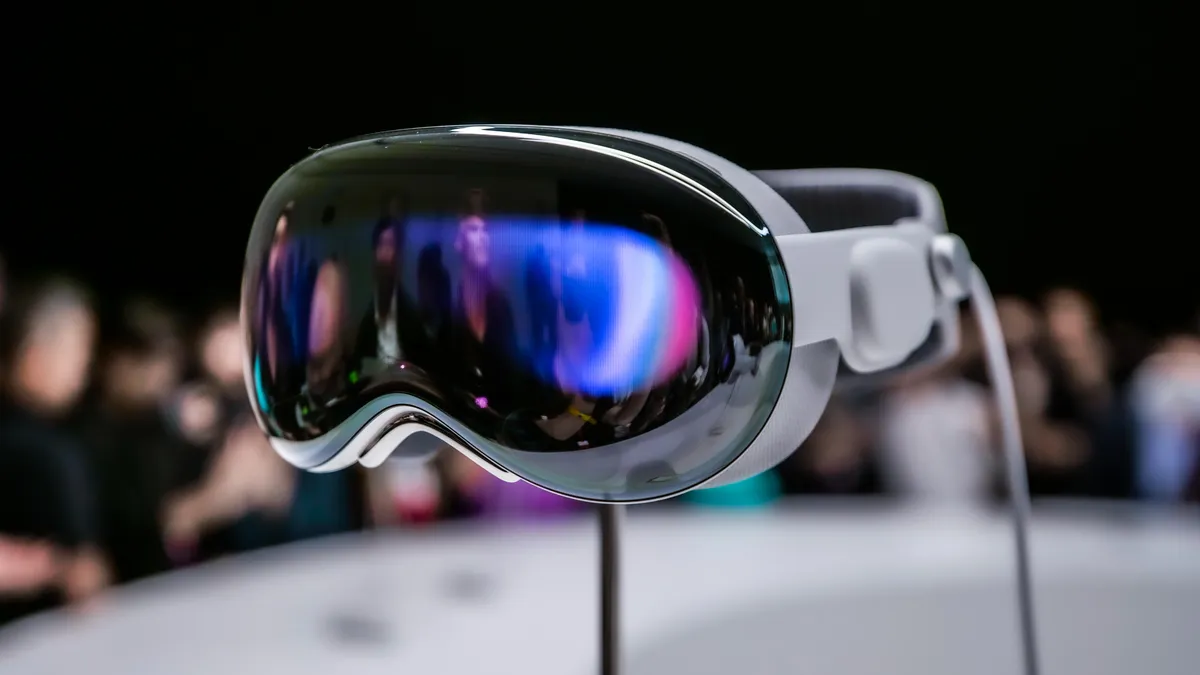
941 views
The first Apple Vision Pro had a problem that became obvious about ten minutes after the demo ended: you wanted to love it more than you wanted to wear it.
The visuals were extraordinary. Eye-and-hand tracking felt like a small magic trick. Then came the weight, the external battery, the isolated feeling, and a price that made even enthusiastic Apple buyers pause.
Apple Vision Pro 2 arrives in a different position. This isn't the moment for another “what is spatial computing?” explainer. GadgetRadar readers already know the premise. The more useful question is simpler: did Apple fix enough of the original Vision Pro's real-world friction to make its second-generation headset worth owning in 2026?
The answer is more nuanced than the launch-day hype suggests.
The short verdict
Apple Vision Pro 2 is a better computer than its predecessor, but it still isn't an effortless everyday device.
The headline improvements focus on performance, comfort, and the maturity of visionOS rather than reinventing the hardware concept. That's probably the right strategy. The original hardware didn't fail because Apple lacked ambition; it struggled because the experience asked users to tolerate too much physical and social friction.
After using this class of headset for work, entertainment, and the occasional “I'll just check one thing” session that somehow turns into 90 minutes of floating windows, the biggest improvement isn't a single benchmark number.
It's the reduced annoyance.
That matters more than another spec-sheet victory.
Apple Vision Pro 2 specs and hardware: what's actually changed?
Apple's Vision Pro platform remains unapologetically premium. The familiar formula is still here: dual ultra-high-resolution micro-OLED displays, advanced eye tracking, hand tracking, spatial audio, passthrough cameras, and a separate battery architecture rather than a self-contained Quest-style headset.
The technical story, though, has shifted.
More headroom where it counts
The second-generation model benefits from newer Apple silicon and a more mature visionOS software stack. Raw processing power matters, but the practical benefit is easier to spot in mixed workloads: several Safari windows, immersive video, spatial apps, Mac Virtual Display, and background system activity competing for resources.
That was one of the original Vision Pro's odd strengths and weaknesses. It could feel astonishingly fast, yet certain tasks exposed the boundaries of an entirely new platform. A window might not land exactly where you expected. An app could lose its sense of place after rearranging your environment. Sometimes you simply had to stop, look around, and remember where you put the thing.
Not a disaster. Still annoying.
VisionOS has had time to mature, and that maturity is arguably more valuable than chasing a dramatic redesign.
Apple's interaction model still relies primarily on eye targeting combined with a finger tap gesture. The system uses cameras and sensors to interpret hand movement rather than requiring traditional controllers for ordinary navigation. That remains one of Vision Pro's strongest ideas because, once calibrated properly, you stop thinking about the input method.
Until tracking fails in bad lighting.
Or your hands disappear under a desk.
Real life has edges.
Comfort is still the make-or-break issue
Here's the uncomfortable truth: a headset can have phenomenal displays and still spend most of its life sitting in a case.
The first Vision Pro made that painfully clear.
Apple's design direction with Vision Pro 2 addresses the part buyers actually feel on their face. Weight distribution, fit options, and strap design matter just as much as processor performance because facial pressure builds gradually. A headset can feel fine for the first 20 minutes and noticeably worse after an hour.
That's the test.
Not the showroom demo.
For productivity, the ideal fit isn't necessarily the tightest fit. Over-tightening can create pressure points while also encouraging the headset to sit in a position that makes the eye-tracking sweet spot less forgiving. A few millimeters of adjustment can make text look sharper and interaction feel more reliable.
It's boring advice. It works.
People who wear prescription glasses should also pay close attention to Apple-compatible ZEISS optical inserts and the exact lens requirements for their prescription. This isn't a cheap accessory category, and buying a spatial computer without accounting for visual correction is an expensive way to discover eye strain.
visionOS in 2026 feels less like an experiment
Hardware gets headlines. Software determines whether you use the thing on Tuesday.
By 2026, visionOS has evolved beyond the early novelty phase. The platform supports familiar Apple workflows alongside immersive applications, spatial media, Safari-based services, and deeper integration with the wider Apple ecosystem.
That last point deserves emphasis.
If your daily setup already revolves around a Mac, iPhone, iPad, AirPods, iCloud Drive, Messages, FaceTime, and Apple's Continuity features, Vision Pro makes considerably more sense than it does as a standalone purchase.
The reverse is also true.
Buying one primarily to watch a few immersive videos, browse the web, and occasionally open virtual screens is difficult to justify at flagship pricing. A cheaper headset can handle parts of that job surprisingly well.
The Mac connection remains a killer feature
Mac Virtual Display is one of the clearest reasons to consider Apple's headset for serious work.
A physical laptop screen has boundaries. Vision Pro doesn't.
You can place a large virtual display in front of you while surrounding it with visionOS windows for Messages, Safari, Notes, Slack, Music, or whatever else belongs in your workflow. With the right keyboard and pointing setup, the experience can feel genuinely productive.
Then something mundane happens.
Your battery runs low.
Or the headset gets warm against your face.
Or you realize you need coffee and suddenly carrying your office around your kitchen feels ridiculous.
That's spatial computing in 2026: brilliant technology, interrupted by human biology.
Display quality is still the reason to care
Apple's display technology remains among the strongest arguments for the Vision Pro line.
Text clarity, pixel density, contrast, and the sense of screen scale can make conventional monitors feel strangely constrained afterward. Watching high-quality 3D content or immersive video on a giant virtual screen is particularly effective because the headset removes the physical limitations of room size.
A small apartment can suddenly contain a cinema-sized display.
That's not marketing fluff. It's the part that tends to stick with people.
Spatial video and immersive content also benefit from Apple's broader media ecosystem. Content availability is still a limitation, however. Hardware capability doesn't automatically produce a deep library, and users should resist buying Vision Pro 2 solely on the assumption that every streaming service will eventually build a perfect native spatial app.
Web access can fill gaps. Native apps are another matter.
Performance for work, entertainment, and gaming
Apple Vision Pro 2 is strongest when you're doing something that benefits from space.
Working with multiple applications is one example. Watching a film is another. Viewing immersive media can be spectacular.
Gaming is more complicated.
Traditional gaming support depends heavily on software availability and compatible input methods. A Bluetooth game controller remains relevant for many conventional games, while the headset's hand tracking shines in experiences specifically designed around spatial interaction.
Don't expect the device to behave like a PlayStation VR replacement.
That's the wrong comparison.
Vision Pro's philosophy is closer to a premium personal computer with an immersive interface than a dedicated gaming console. The distinction affects everything from software libraries to accessories and price expectations.
Performance verdict by use case
Use case | Vision Pro 2 experience |
|---|---|
Movies and immersive video | Excellent |
Multi-window productivity | Excellent, with comfort caveats |
Mac-based workflows | One of its strongest use cases |
Casual spatial apps | Very good |
Traditional gaming | Limited compared with dedicated gaming VR |
Long, uninterrupted workdays | Improved, but physical comfort still matters |
Travel and hotel-room use | Compelling, provided battery management isn't a problem |
Battery life: still a compromise
A tethered battery is not elegant. Apple knows that.
The external battery arrangement reduces weight on the user's face, but it introduces another object to manage. You have to think about where the battery goes when sitting, moving around, or working in a cramped seat.
There's also the classic mistake: standing up and forgetting where the cable is.
Anyone who says this never happens probably hasn't used the headset outside a carefully staged desk setup.
Battery capacity and real-world runtime depend heavily on workload, display activity, immersive content, and environmental conditions. Streaming video, heavy spatial applications, and intensive passthrough use don't behave like a static specification sheet.
The sensible approach is to treat Vision Pro 2 like a high-end laptop: charge before extended sessions and plan around power if you're traveling.
Price and value: the hardest part of the review
This is where Apple Vision Pro 2 becomes difficult to recommend universally.
The Vision Pro concept sits at the intersection of luxury hardware, early-adopter technology, and professional-grade computing. Storage configuration, optical inserts, accessories, and regional availability can push the total ownership cost well beyond the headline figure.
Apple buyers considering different storage capacities should also think beyond today's app library. Spatial video files, downloaded immersive media, offline content, and large creative projects can consume local storage faster than conventional smartphone apps.
Cloud storage doesn't solve every problem either.
An iCloud subscription expands cloud capacity across Apple services, but that doesn't mean every app can treat iCloud as unlimited high-speed local storage. Downloaded media and application assets can still require significant device storage.
Small distinction. Expensive if ignored.
Who should buy Apple Vision Pro 2?
Vision Pro 2 makes the most sense for three groups:
Apple ecosystem power users who already work heavily across Mac and iCloud services.
Creative professionals and developers exploring spatial interfaces, immersive media, 3D workflows, or visionOS applications.
Well-funded enthusiasts who value the best available visual and interaction technology and understand the platform's limitations.
For everyone else, patience remains a perfectly reasonable strategy.
That's not a criticism. Consumer technology often improves when the second and third generations benefit from the uncomfortable lessons learned by early adopters.
Apple Vision Pro 2 vs cheaper mixed-reality headsets
The obvious temptation is to compare Vision Pro 2 directly with Meta's Quest lineup or other mixed-reality devices.
Price alone makes the comparison unavoidable.
But they're built around different compromises.
A less expensive headset may offer better value, stronger gaming support, or a simpler all-in-one setup. Vision Pro 2 counters with Apple's hardware integration, display quality, eye-and-hand interaction model, spatial audio, and its connection to macOS and the wider Apple ecosystem.
The better question isn't “which headset is best?”
Ask what you actually plan to do after the first week.
If the answer is gaming, exercise, and social VR, Apple's premium headset may be excessive. If the answer is replacing hotel-room monitors, watching films privately, developing spatial software, and experimenting with a new computing interface, the calculation changes.
Quite a lot.
Frequently asked questions
Is Apple Vision Pro 2 worth upgrading to from the original?
That depends on how much the hardware refinements and newer performance matter to you. If comfort or performance limitations reduced your use of the first model, the upgrade is easier to justify than if your original Vision Pro already fits well and handles your workflow comfortably.
Can Apple Vision Pro 2 replace a Mac?
Not completely for most professionals. It works best as an extension of a Mac-based workflow rather than a universal replacement for desktop software, ports, file management, and specialized applications.
Does Apple Vision Pro 2 work with Bluetooth keyboards and controllers?
Yes, compatible Bluetooth accessories remain important, particularly for productivity and conventional gaming. Hand tracking is excellent for spatial interfaces, but it isn't always the fastest input method for typing or precision control.
Is Vision Pro 2 good for watching movies?
Absolutely. The virtual screen size, display quality, spatial audio, and private viewing experience remain among the strongest reasons to own the device.
Should I wait for a cheaper Apple headset?
If price is your biggest hesitation, waiting is sensible. Vision Pro 2 is still aimed at buyers willing to pay for premium hardware and early access to Apple's spatial computing direction rather than shoppers looking for the lowest-cost entry point.
Final verdict: impressive, expensive, and finally easier to live with
Apple Vision Pro 2 doesn't solve the fundamental question surrounding spatial computing: how often do people genuinely want a computer strapped to their face?
No processor can answer that.
What it can do is make the experience fast enough, comfortable enough, and useful enough that the question stops interrupting every session.
For the right buyer, Vision Pro 2 is one of the most technically impressive personal computers available in 2026. The displays are still stunning. Spatial interaction still feels years ahead when it works perfectly. The Apple ecosystem integration gives it practical value that standalone VR headsets can't easily replicate.
For most people, though, the price and physical reality of wearing a headset remain the barriers.
So don't buy it because the future looks cool in a keynote. Buy it if you can name three things you'll actually do with it every week. Then test the fit, check your prescription requirements, and spend at least an hour in the headset before making the call.
That's the real review test.
And it's one Apple Vision Pro 2 finally has a better chance of passing.
Apple Vision Pro 2 review
Vision Pro 2 features
Apple VR headset 2026
Vision Pro 2 performance
Apple Vision Pro verdict
Found this helpful? Share it!