
Framework Laptop 16 Review: Modular Design & Real Performance
582 views
Buying a powerful laptop usually comes with an annoying bargain: enjoy the performance now, then accept that a future upgrade probably means replacing the entire machine.
More RAM? Maybe impossible. Better graphics? Forget it. A newer processor? Start shopping again.
The Framework Laptop 16 takes a very different route.
This 16-inch machine is built around the idea that a laptop should behave less like a sealed appliance and more like a platform. You can replace the mainboard, swap memory and storage, change ports through Expansion Cards, rearrange input modules, and—most unusually for a modern notebook—upgrade the dedicated graphics module.
That concept has been tested against real hardware now, not just marketing promises. The current generation adds AMD Ryzen AI processors, Wi-Fi 7, revised cooling, and an optional Nvidia GeForce RTX 5070 Graphics Module, while older Laptop 16 owners can upgrade selected components rather than throwing away the whole chassis.
There is one complication, though.
This exact title and a broadly similar review angle already exists on GadgetRadar, published in April 2026. A straight rewrite would create obvious duplication.
So this version takes the more useful route: a follow-up review focused on what modularity actually costs, how the newer hardware performs, where the upgrade system gets awkward, and whether the Laptop 16 makes financial sense outside the enthusiast bubble.
The real appeal isn't the GPU
The RTX 5070 gets attention. Naturally.
A laptop graphics card that can be physically replaced is still unusual enough to sound slightly absurd in 2026. But the smarter part of the Framework Laptop 16 is the combination of several smaller decisions.
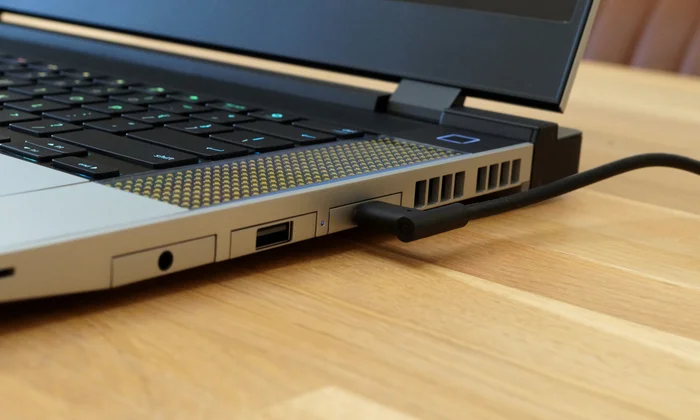
The machine uses replaceable DDR5 SO-DIMM memory and M.2 NVMe storage, while its Expansion Card system lets users assign ports to specific bays. USB-C, USB-A, HDMI, DisplayPort, Ethernet and storage cards can be selected according to the configuration you actually need.
That sounds like a small thing until you travel.
Instead of carrying a USB-A dongle because a presentation venue has an ancient receiver, you can install a USB-A Expansion Card. Need full-size Ethernet for a local NAS or wired office network? Swap a card. Want extra portable storage without permanently opening the chassis? Framework's storage expansion approach makes that possible too.
It's practical modularity, not modularity for the sake of showing off.
The input area goes even further. The Framework Laptop 16 supports configurable keyboard, numpad and macro-pad arrangements, meaning the layout can be adapted around gaming, creative applications or productivity workflows.
That's the part conventional laptops still struggle to answer.
A Lenovo Legion or Razer Blade may give you more performance per dollar at purchase. Six years later, however, replacing a failed port, upgrading the mainboard or changing the GPU usually isn't part of the ownership plan.
With Framework, it is the plan.
2025 hardware changes the performance conversation
The original Framework Laptop 16 launched with AMD's Ryzen 7 7840HS or Ryzen 9 7940HS and optional Radeon RX 7700S graphics. Those configurations were competent, but the economics were uncomfortable.
A high-spec modular laptop could cost well over $2,000 while faster conventional gaming laptops were available for similar money.
The newer configuration addresses part of that problem.
The updated Laptop 16 uses AMD's Ryzen AI 7 350 platform and offers an Nvidia GeForce RTX 5070 Laptop GPU through Framework's Graphics Module system. Independent testing recorded a Geekbench 6 single-core score of 2,878 and a multi-core score of 12,399, while a 25GB file transfer reached roughly 1,724.69 MB/s using a 1TB WD Black SN770 SSD in the tested unit. A HandBrake 4K-to-1080p transcode completed in 4 minutes and 18 seconds.
Those numbers tell a fairly clear story.
The CPU is quick for everyday work, software development, photo editing and moderate video production. It isn't designed to destroy every high-wattage Intel HX gaming processor in multi-core workloads. A bigger, less modular laptop can still win that contest.
For most real workloads, that distinction matters less than benchmark charts suggest.
Running Chrome or Firefox with a ridiculous number of tabs, Slack, Discord, VS Code, Lightroom and a local development environment isn't particularly stressful for the Ryzen AI 7 350 configuration. The friction appears elsewhere: heavy exports, sustained compilation, large 3D renders and workloads that can exploit substantially more CPU cores.
That's where a desktop replacement still makes more sense.
RTX 5070: finally, proper gaming horsepower
The Nvidia Graphics Module is a much bigger deal than the original Radeon RX 7700S option.
Testing by Tom's Hardware showed the RTX 5070 version reaching 132 FPS in Shadow of the Tomb Raider at 1080p and 76 FPS at its 2560 × 1600 native resolution. In its Metro Exodus stress test, the system averaged 91.95 FPS across repeated runs.
Tom's Guide reported similarly dramatic gains, measuring approximately 127 FPS in Shadow of the Tomb Raider, 37.9 FPS in Cyberpunk 2077, and 85 FPS in Far Cry 6 at 1080p in its testing.
The important difference isn't just the raw frame rate.
It's DLSS.
Games that support Nvidia's upscaling technology can give the Framework considerably more flexibility than the original AMD configuration. You can choose native rendering, DLSS Quality, or a more aggressive performance preset depending on the game and the frame-rate target.
That matters in titles like Cyberpunk 2077, where native resolution and ray tracing can turn even capable laptop hardware into a compromise factory.
WIRED's testing found the RTX 5070 configuration capable of 93 FPS in Cyberpunk 2077 at 1920 × 1200 and 56 FPS at 2560 × 1600 at maximum graphics settings without enabling upscaling or ray tracing. More demanding games, particularly Black Myth: Wukong, demanded more compromise.
So, no, the Framework Laptop 16 isn't secretly an RTX 5090-class monster.
It doesn't need to be.
The upgradeable GPU gives it something more interesting: a credible path from integrated graphics to dedicated graphics without replacing the entire laptop.
Where the modular design gets messy
Now for the less glamorous bit.
Modularity creates seams. Literally.
The Framework Laptop 16 has been praised for repairability and criticized for some of the physical compromises required to make that repairability possible. Reviews have noted occasional fit-and-finish issues, component alignment quirks, chassis creaking and a display lid that doesn't feel as rigid as the premium monolithic construction found on machines such as the Razer Blade series.
That doesn't mean the machine feels cheap.
It means it feels engineered to come apart.
There is a difference.
The first time you configure the Expansion Cards, the process is almost suspiciously simple. Later, however, you'll notice that modularity introduces decisions you normally never have to make. Which ports should occupy which bays? Do you need six cards immediately? Are you buying storage internally or through an expansion solution? Should you pay for the GPU now or upgrade later?
A conventional laptop removes those choices.
Framework hands them back to you.
That freedom is great until you start adding up the invoice.
The price problem hasn't disappeared
This remains the Framework Laptop 16's hardest sell.
The entry point is far easier to justify than a fully loaded system, but once you add premium storage, additional memory, Expansion Cards, input modules and a dedicated GPU, the price climbs rapidly.
Earlier configurations illustrate the issue well: the original Ryzen 7 7840HS DIY Edition started at $1,399 before RAM, storage, operating system, Expansion Cards and other components, while adding the Radeon RX 7700S Graphics Module pushed costs substantially higher.
The newer RTX 5070 machine performs far better, but it still carries what might be called a modularity premium.
You're paying for:
User-serviceable parts and accessible documentation.
A replaceable mainboard rather than a disposable motherboard.
Upgradeable graphics.
Configurable ports and input hardware.
The possibility that the machine's next major upgrade won't require replacing its screen, keyboard, chassis, speakers and battery along with everything else.
That last point is impossible to benchmark.
It could also save you money—or not.
If you upgrade every year, the Framework approach probably won't magically make laptop ownership cheap. If you normally keep hardware for five, seven or even ten years and are willing to install components yourself, the equation changes.
Who should actually buy one?
Not everyone.
If you need the highest gaming frame rates for every dollar spent, a conventional gaming laptop is usually the more rational purchase. The RTX 5070 Framework performs well, but systems built around higher-power RTX 5070 Ti, RTX 5080 or RTX 5090 configurations can deliver significantly more performance.
The Framework makes more sense for a specific type of buyer.
You're a long-term owner
This is probably the ideal customer.
You dislike replacing a functioning laptop because one component has become outdated. You can open a machine without panicking. A screwdriver isn't a mysterious object.
Perfect.
You use different setups
Maybe your desk has Ethernet and DisplayPort. Your travel bag needs USB-A and USB-C. A fixed-port laptop forces you into adapters and hubs.
The Expansion Card system is much more elegant for that kind of mixed workflow.
You care about repairability—but still want power
The original Laptop 16 made you choose between repairability and truly competitive graphics performance.
The RTX 5070 option narrows that gap considerably.
A quick reality check before buying
Ask yourself two questions.
Would I genuinely upgrade individual parts later?
Am I willing to pay more now for that option?
If the answer to either is "no," don't force the Framework philosophy onto your budget.
A cheaper laptop with better immediate specifications may serve you better.
But if replacing a GPU module in three years sounds far more appealing than selling an entire laptop at a loss, the Framework Laptop 16 occupies a category with remarkably little competition.
Framework Laptop 16 FAQ
Is the Framework Laptop 16 good for gaming?
Yes, especially with the Nvidia GeForce RTX 5070 Graphics Module. It handles modern games far better than the original Radeon RX 7700S configuration, though similarly priced conventional gaming laptops can still offer more raw performance.
Can you upgrade the GPU later?
That's one of its defining features. The Laptop 16 uses a removable Graphics Module, allowing owners to upgrade compatible graphics hardware without replacing the entire laptop.
Can I install my own RAM and SSD?
Yes. The DIY-oriented design supports replaceable DDR5 SO-DIMM memory and M.2 NVMe SSD storage, making upgrades and repairs far easier than on most sealed premium laptops.
Is the Framework Laptop 16 worth the higher price?
For maximum performance per dollar, probably not. Its value is in longevity, repairability and the ability to upgrade individual components. The longer you realistically keep and upgrade the machine, the easier the premium is to justify.
Is Windows the only option?
No. Framework supports operating-system flexibility, and the Laptop 16 can be configured for Windows or used with Linux distributions, making it particularly appealing to developers and users who prefer open platforms.
The smarter way to think about this laptop
The Framework Laptop 16 shouldn't be judged solely by the question, "How fast is it today?"
That's too easy.
The more interesting question is what happens after two or three years of ownership. A conventional laptop may still be perfectly usable, but upgrading its CPU or graphics hardware could mean buying another complete machine. Framework's architecture gives you a different option: replace the part that actually became the problem.
That approach still carries compromises. The price can get uncomfortable. The physical design isn't as perfectly polished as the sleekest sealed laptops. Configuration takes more thought.
Still, the RTX 5070 generation proves something important.
Modular laptops no longer have to mean accepting mediocre performance.
If the Framework Laptop 16 fits your budget, buy the configuration you need now—but don't overspend on components you can easily replace later. That's the whole point. Start with the right foundation, keep the chassis in service, and let future upgrades do the heavy lifting.
Framework Laptop 16 review
modular laptop
Framework 16 performance
upgradeable gaming laptop
Framework Laptop 16 specs
Found this helpful? Share it!